
My First Docker Experience 🐋
Containers, Chaos, and a 7-Hour Build
Docker really humbled me. But I managed to get through it, and here's everything I did, the commands I ran, and every roadblock I hit along the way. If you're like me, just learning and starting out with Docker, this would be valuable to you.
What Is Docker?
A quick mental picture: Docker is what helps us package an application and everything it needs to run: the code, the runtime, the dependencies into a single portable unit called a container. That container can run on any machine that has Docker.
It is like a lunch pack. You pack everything your app needs inside it, seal it up, and take it anywhere.
Setting Up
The first thing I needed was Docker Desktop installed, and a project folder. I created mine and called it docker-app and set up the basic files:
touch server.js
touch .DOCKERIGNORE
touch creates an empty file. server.js would be my Node.js application, and .DOCKERIGNORE tells Docker which files to exclude from the build, similar to .gitignore we saw in Git.
Writing the Dockerfile
The Dockerfile is the ‘recipe’ Docker follows to build the container image. This was mine (the statements after # are my notes, I am trying to build a habit of carefully labeling my commands):
#Base image — using Alpine Linux (lightweight, it is only a few MB)
FROM node:20-alpine
#Set the working directory inside the container
WORKDIR /app
#Copy package files first (for proper caching)
COPY package*.json ./
#Install dependencies
RUN npm install
#Copy the rest of the application
COPY . .
#Tells Docker which port the app listens on
EXPOSE 3000
#Set an environment variable for the port
ENV PORT=3000
#The command that runs when the container starts
CMD ["node", "server.js"]
Building the Image
docker build -t tobechukwuejiofor/docker-app:v1 .
This command builds a Docker image from the Dockerfile in the current directory (.). The -t flag tags it with a name and version: tobechukwuejiofor/docker-app:v1.
And this is where my first problem started.
The build got stuck here for over 7 hours. I literally went to sleep, and came to check in the morning:
[+] Building 26575.5s (0/1)
 => [internal] booting buildkit
 => => pulling image moby/buildkit:buildx-stable-1
Docker was trying to pull its build engine (buildkit) but it was completely frozen. The culprit turned out to be Resource Saver mode — a Docker Desktop feature that pauses the engine when idle. When I tried to build, Docker was half-asleep and didn’t wake up properly.
The fix: Settings -- Resources -- Resource Saver -- Off -- Apply & Restart.
After that, the build ran in under 5 minutes. 289 seconds to be exact, and it worked.
Checking Your Images
docker images
This lists all the Docker images stored locally on your machine. After my build, I could see:
IMAGE                             ID             SIZE
hello-world:latest                5dd0d3e6e255   25.9kB
nginx:latest                      8541484afbc9   241MB
tobechukwuejiofor/docker-app:v1   056b16d5c6f3   208MB
My image was there: 208MB, built and ready.
Running the Container Locally
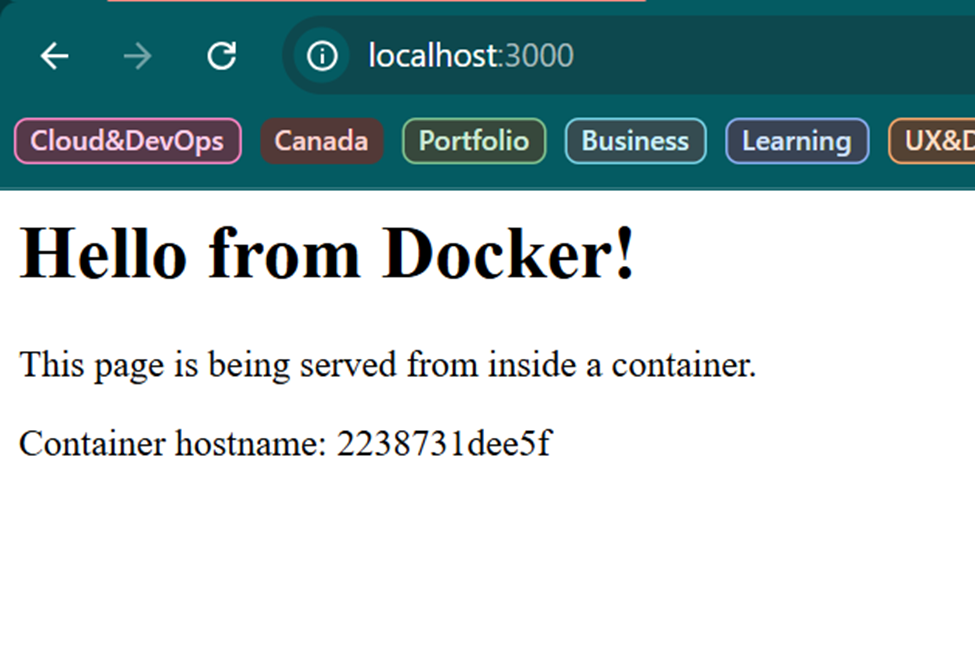
docker run -d -p 3000:3000 --name docker-app tobechukwuejiofor/docker-app:v1
This runs the image as a container:
-d— detached mode, runs in the background-p 3000:3000— maps port 3000 on the PC to port 3000 inside the container--name docker-app— gives the container a nameThe last part is the image name and tag
docker ps
Lists all running containers. I could see mine up and running:

docker logs docker-app
Shows the output from inside the container, like opening the console. Mine printed:
Server running on port 3000
That meant the app was alive inside the container.
Stopping and Cleaning Up Locally
docker stop docker-app
docker rm docker-app
docker stop gracefully stops a running container.
docker rm removes it entirely.
After both commands, docker ps showed an empty list — clean slate.
Pushing to Docker Hub
Docker Hub is like GitHub for container images. To deploy to the cloud, I needed to push my image there first.
docker login
Logs you into Docker Hub. Mine required web-based authentication; it opened a browser tab with a one-time code to confirm my identity.
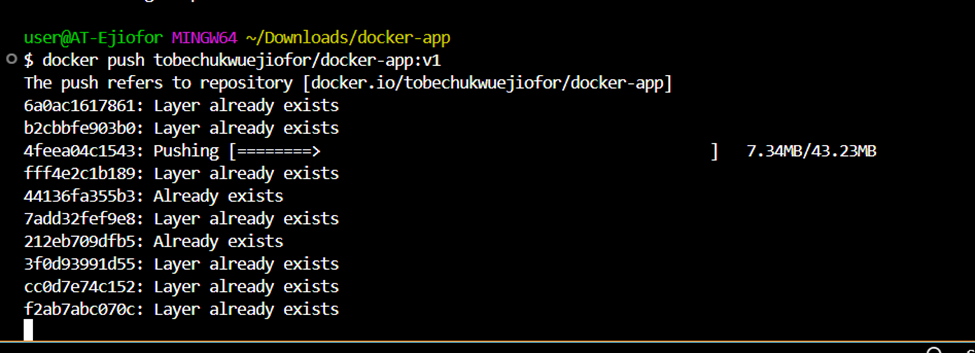
docker push tobechukwuejiofor/docker-app:v1
Uploads the image layer by layer to Docker Hub. The first push took a while, but subsequent ones are faster because Docker only uploads layers that have changed.
I hit a timeout mid-push but simply re-ran the command, and it picked up where it left off. Layers already uploaded showed as Layer already exists.
Deploying to Azure Container Instances
With the image on Docker Hub, the next step was running it in the cloud using Azure Container Instances (ACI) Azure's way of running containers without managing any servers.
az group create --name docker-guide-rg --location eastus
Creates a resource group to hold the container and related resources.
az container create --resource-group docker-guide-rg \
--name docker-app-container \
--image tobechukwuejiofor/docker-app:v1 \
--port 3000 \
--dns-name-label docker-app-tobechukwuejiofor \
--cpu 1 \
--memory 1 \
--os-type linux \
--registry-login-server index.docker.io \
--registry-username tobechukwuejiofor \
--registry-password my_access_token
This command tells Azure to:
Pull the image from Docker Hub
Create a container running Linux
Allocate 1 CPU and 1GB of memory
Expose port 3000 publicly
Assign a DNS name so it's accessible via a URL
This also didn't go smoothly the first time. Azure kept returning:
RegistryErrorResponse: An error response is received from the docker registry 'index.docker.io'. Please retry later.
This was Docker Hub rate-limiting anonymous pulls from Azure's IP ranges. The fix was adding my Docker Hub credentials (--registry-username and --registry-password) so Azure could authenticate before pulling. I used a Docker Hub Access Token instead of my password, which is the recommended approach.
One more problem: my token contained special characters that the terminal interpreted as commands. The * in the password caused Git Bash to throw a command not found error mid-command. The solution was switching to a cleaner token without shell-special characters.
Eventually it went through and the output showed:
"state": "Running"
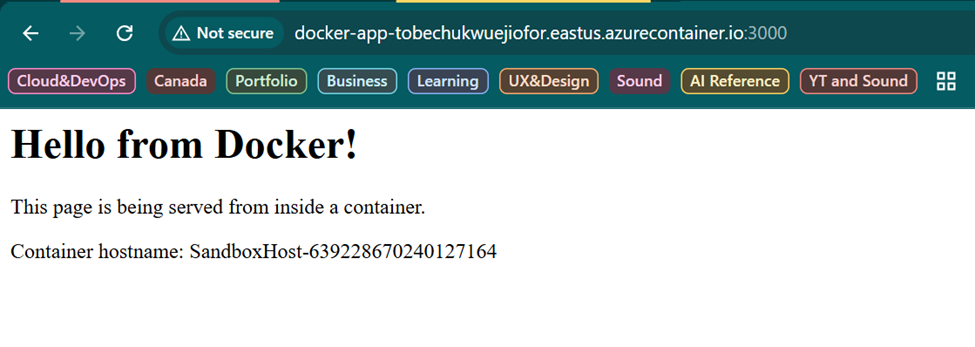
"fqdn": "docker-app-tobechukwuejiofor.eastus.azurecontainer.io"
"ip": "52.249.241.***"
Container deployed. App running. Accessible via public URL. That's the full loop: from code on my laptop to a live container in the cloud.
Cleaning Up
az group delete --name docker-guide-rg
Deletes the entire resource group and everything inside it. Always do this after learning exercises because Azure charges for running containers.
What I Learned
The Docker workflow in plain English:
Write a Dockerfile describing how to build your app
docker build — bake it into an image
docker run — run it as a container locally
docker push — upload the image to Docker Hub
Deploy from Docker Hub to a cloud platform
The mistakes that taught me the most:
Resource Saver mode silently broke my build for 7 hours. Always check Docker Desktop's status before assuming the command is the problem
Shell special characters in passwords: terminals interpret
*,$, and&as commands. Use access tokens with alphanumeric characters when passing credentials in CLI commandsDocker Hub rate limits: Azure pulls images anonymously by default. Always pass registry credentials when deploying from a public registry to avoid throttling
Docker stressed me, but eventually worked for me not from reading about it, but from hitting every error it could throw and working through each one. That's the way it really sticks. I hope.
See you in the next one. 🐳


